Announced/Released: 2018
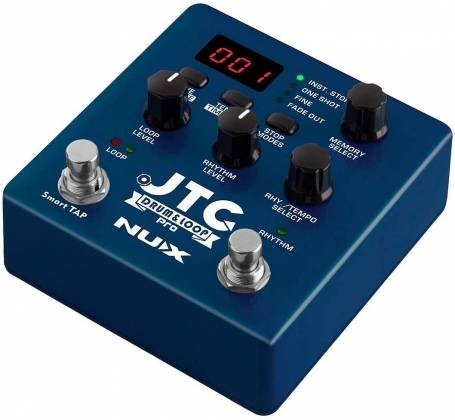
Thankfully, Nu-X opted to release a bigger & better version of its JTC Drum & Loop Mini pedal, with a little bit more of almost everything!! The Nu-X JTC Drum & Loop Pro pedal picks up where the Mini left off, tho still retaining the same 24 bit, 44.1 sampling rate as before. (Yes, The ‘JTC’ still stands for ‘Jam Track Creator’)
The basic features are: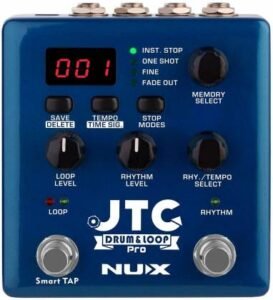
- 24 bit, 44.1 wav
- 6 hrs recording time
- 256 memory locations
- Unlimited overdubs
- Undo/Redo
- Output Routing options
- Built-In effects & Sims
- 4 different Stop modes
- Smart tap Tempo
- Drum Fills
- Auto/Normal Record Modes
- Rec/Play/OverDub or Rec/OverDub/Play Modes
As with the JTC Mini pedal, there is connectivity via the USB-Micro ‘B’ port, however it only allows for firmware updates & file transfers. It is not meant for DAW Interface or for power input. On that note, there is also no battery compartment, you’ll need to use the supplied power adapter or a compatible 9vdc power input
The drum portion of the JTC has been upgraded & modified, now offering 40 rhythm patterns in two different time signatures (4/4 and 3/4 time) and various styles/genres or shuffles. tempo can be adjusted adjusted anywhere between 40 – 240 BPM. You can add drum fills on command using the secondary foot switch. Although the fills are a bit limited, each pattern loads one fill for you to activate at will.
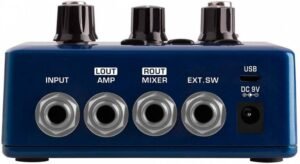
One of the best features of the JTC Pro is the ability to split the output of Guitar/Drums between the two output ports. You can have everything coming out together in stereo, or the guitar on one side & drums on the other. The Onboard effects allow you to add a Cab Sim to the Right output, which is intended to go to a mixer or the PA powered speakers. The Left Output can have an EQ Compensation allied that is intended to be used for Drums, if they are being sent to an amp of some kind. You’ll find that it tries to corrects for the missing tones & frequencies of the Amp. (Drums will sound very harsh without it)
The separate Loop & Drum Level control knobs make easy work of getting the mix you’re after. There is a Smart Tap Tempo available, either via the small button on the top face, or via the Secondary Foot Switch.
256 memory locations ?? That’s a lot – Why so many, if there’s only 40 Drum patterns to choose from ??
Well, How many of us wish we could switch up the drum pattern for a chorus or a bridge part of a song? Does anyone really just use one pattern and one fill for a whole song?? Some do, but those wanted a little more variety in their performance can have much more interesting power at their feet. That’s where the external dual foot switch comes in !! Using a TRS cable, you can connect a dual foot switch to the external controller port, which is pre-designed to give you the ability to move seamlessly up and/or down thru the 256 memories at your disposal!!
Imagine that you have set memory #62 to have a certain drum pattern, start mode, stop mode, and whatever else you like, and then set up memory #63 to use a slightly different drum pattern, or a different tempo of the same pattern, or other different settings, such as a different stop mode, like Fadeout.
You start your performance on Memory #62 the way you normally would. Having the external foot controller connected allows you to quietly switch to the next memory where the new drum pattern and/or settings take over on the next ‘One’ beat. Now you’ re in the next part of the song with a different pattern (which you’ve saved ahead of time) and you’ll also have a different drum fill to play with. You can later return to Memory #62 for the next verse or proceed to memory #64, where you may have yet another pattern ready with yet another selection of settings ready. You are only able to move sequentially thru the memory locations, up or down, but that may give you all kinds of options you didn’t have before!! A complete song performance with alternating drum patterns and more than one fill, and all set to fade out at the very end in the last memory#. Now imagine doing something like this, but using various backing tracks of your choosing loaded into those adjacent Memory locations !!
Nu-X offers free file converter software for Mac or Windows thaat’ll make your backing tracks (wav files) compatible with the JTC pedal.
Overall, this pedal is a pretty solid build, and feels like a good pedal.
- You can find the User’s Guide here (in English)
- Other Languages available here, as well as Utilities & Software
- (At the bottom of this page)
Where to Buy: