Electro-Harmonix 2880 – Release Date: 2006
With their first looping pedal since the initial legendary 16-Second Delay/Looper in the previous century, the Electro-Harmonix 2880 may have sparked a looping rivalry between some of the largest players in the effects pedal game: Boss, Digitech & EHX. Discontinued since 2013, you’d be somewhat lucky to stumble across a 2880 Looping rig nowadays. But you may find one on a used gear shelf in a local music store or in a second hand shop.
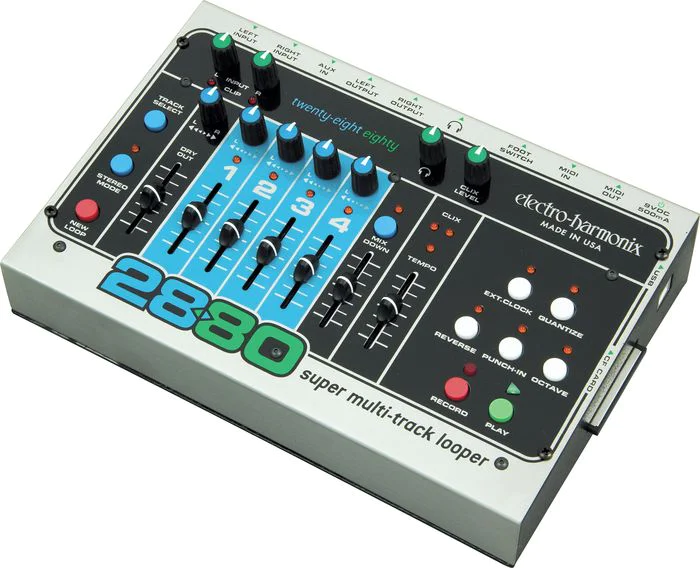
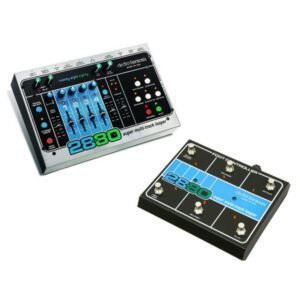 It was a very interesting piece of gear, designed more-so in the traditional layout of a multi-track recording console, and a complimentary accessory pedal that allowed foot control and greatly expanded on the usability of the Electro-Harmonix 2880 into the realm of a musician’s live performance tool. In keeping with the multi-track recording concept, there is a ‘Punch-In’ feature that would allow you to correct a bad take if you need, before moving on. Those familiar with using almost any multi-track recorder will have a much easier time familiarizing with how to use this great feature. I am not aware of other looper pedals that offer this ability.
It was essentially able to capture and layer multiple tracks, manipulate them, mix them down onto a stereo pair (if desired), and then keep on recording & adding more layers.
While you could record to 2 tracks at once (either 1 / 2 or 3 / 4) using different instruments plugged into the L&R In, you must be in stereo mode to accomplish this, which may impact your options somewhat. Think of it as being more like just having two stereo tracks split into dual mono with controls for each side. I suspect that’s really what the Electro-Harmonix 2880 is doing internally, behind the scenes.
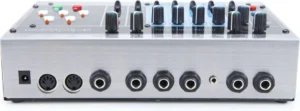
The main features:
- 16 Bit uncompressed digital audio
- 44.1 Khz Sampling rate
- Compact Flash card storage, from 128Mb to 2 Gb
- USB connection to computer
- Onboard Click Track
- Left & Right 1/4″ TS inputs

- Aux In (Mini TRS, Stereo)
- Left & Right Out (1/4″ TS)
- Headphone Out
- Ext Controller In
- Midi In/Out, 5 Pin DIN
- Octave & Reverse Track Effects
- Quantize option
- Auto-advance to the next track
- Fader controls for each track level
- Track Select button to select Track (Scrolls 1-4)
- Loop Decay in Overdub mode
- Able to record to 2 tracks simultaneously
- ‘Punch In’ Mode to fix mistakes during recording
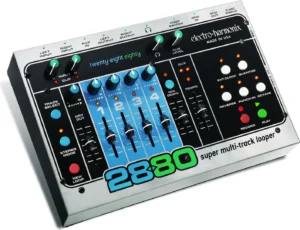
Using Compact Flash cards, you’ll have about a half hour of recording time per Gb.
Any audio device plugged in to the Aux in jack is NOT recorded to any tracks, and only outputs with the rest of your mix. You need to use that device’s level controls to achieve a proper mix, as there is no level control for the Aux Input onboard the 2880.
Due to the 2880’s internal design architecture, Loop Decay is inherently possible as you Overdub over previously recorded material. The Loop Level Fader, when in Overdub Mode, would act as a Feedback control in most delay pedals. By this design, I believe the 2880 would actually re-record (replace) the track, using the fader’s setting as it’s new input level, while it also added your new layer. So, if you set the fader to 50%, the already recorded track would only be half the volume on the next overdub, while your new layer would be louder. Each subsequent layer would then reduce the previous layers by half, (or whatever you’ve set the Fader to). This all results in a much more natural sounding layering that will not become a jumbled mess of sound after a few layers, if you want that option. Setting the fader to Full, 100%, would result in no reduction of volume for previous tracks.
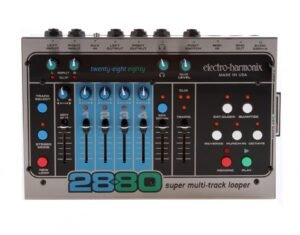 You can activate a Quantize function, which will activate an onboard metronome that will give you a 4-beat count in before recording starts. Below the Quantize button, there is a fader to adjust the tempo of the click. Quantize will allow you to stop the recording at the end of the previous bar or at the end of the current bar, depending if you press the Stop or Play within the first two beats, or the last two beats of a measure. This can really confound a musician if they are not aware of this obscure detail.
You are able to easily ‘Bounce’ your 4 tracks down to a stereo mix, using the 4 track faders to set your track mix levels, and the Bounce fader to set an overall mix level. You can NOT capture your live playing onto the Bounce track while doing so.
You’ll absolutely want(or need) to get the accessory pedal for the Electro-Harmonix 2880, otherwise it’ll likely be restricted to being a table top hand controlled looper.
And you’ll also benefit from getting and reading the User’s Guide (see below) for this pedal while it’s still available at the EHX website, as it is not completely intuitive for most users.
Where to Buy: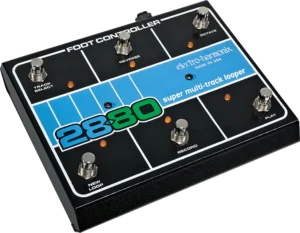
Looking for Compact Flash Cards ??
- I might be inclined to try a 4Gb card, but I may be leary of ordering one of higher capacity, in case the 2880 cannot recognize it…